Overlays › Timer
About this tool
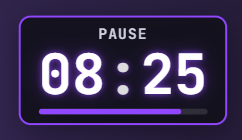
Countdowns and stopwatches for your stream overlay: for breaks, "starting soon", challenges or as a stream clock. Up to 5 timers at once, shown as hh:mm:ss.
Runs in one OBS browser source, no bot login needed.
- Each timer counts down or up – a stopwatch can have a goal if you like. Time keeps running on the server, even when OBS reloads.
- You decide what happens at the end: stay at zero, hide after a few seconds or keep counting into overtime. Add your own text instead of 00:00 (e.g. "Back in a moment!"), a blink or confetti effect, a sound and, if you like, a chat message via ChattyRoo.
- Shortly before the end the time changes color and pulses, optionally with a quiet tick during the last 10 seconds.
- Control your timers from the dashboard, the stream cockpit (your mods too) and chat commands: !pause starts, !pause 10:00 sets a new time, !pause +5m adds time, !pause reset resets it. Commands work for you and your mods only, optionally for VIPs too.
- Viewers can check the remaining time with !zeit.
- Fully customizable design: card, pill or numbers only, font, size, colors, border, glow, progress bar and position. Every timer gets its own color and, if you like, its own overlay link – so your break timer only shows up in your break scene.
Runs in one OBS browser source, no bot login needed.
How to get started
1
Log inwith your Twitch account
2
Unlockby subscribing to my channel
3
Add to OBSURL as browser source