 i3ucky's Tools
Overlays › Chat-Overlay
About this tool
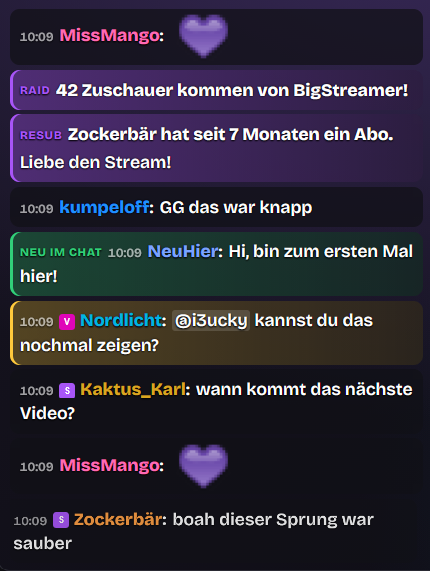
Show your Twitch chat right on stream, styled to match your overlay. Twitch emotes are always included, your channel's 7TV, BTTV and FFZ emotes optionally too – messages made only of emotes get bigger. Badges appear in front of the name, including your channel's own sub badges.Filters keep the chat clean: commands with !, known bots and ChattyRoo stay out, messages with links or blocked words disappear completely or get ***. Whatever your mods delete or time out in chat also disappears from the overlay instantly. Optionally show only subscribers, VIPs or mods.Important things stand out: first-time chatters, channel point messages, mentions of your name or custom keywords as well as messages from you, mods, VIPs or subscribers can get their own color. Subs, gift subs, raids and announcements appear as their own card.12 ready-made designs to click through – from minimal to neon, comic, glass and terminal to a ticker at the bottom of the screen. Save your own designs under a name and switch with one click, or share them with other streamers as a code.And everything is freely adjustable: bubbles, speech bubbles with a tail, cards with a color stripe or plain text, name as a colored tag or the whole message tinted in the name color, borders, glow, frosted glass, profile pictures, left or right aligned, position and size, font (any Google font too), colors, spacing, corners and shadows.Motion of your choice: messages slide, pop, bounce, shake, flip in or type themselves out like a typewriter. When nobody writes for a while, the chat hides itself. When lots of people send the same emote, it rains across the whole screen.For pros: pronouns after the name, replies with context, always highlight certain viewers and a field for custom CSS.Clear or pause the chat with one click in the dashboard or the stream cockpit – for spoilers or spam, your mods can do it too.Runs in one OBS browser source, no bot login needed.
How to get started
1
Log inwith your Twitch account
2
Unlockby subscribing to my channel
3
Add to OBSURL as browser source